Solar System Simulator
2024
·
A Three.js solar system you can fly around — real-ish scale, textures, and a camera that follows each planet.
What it is
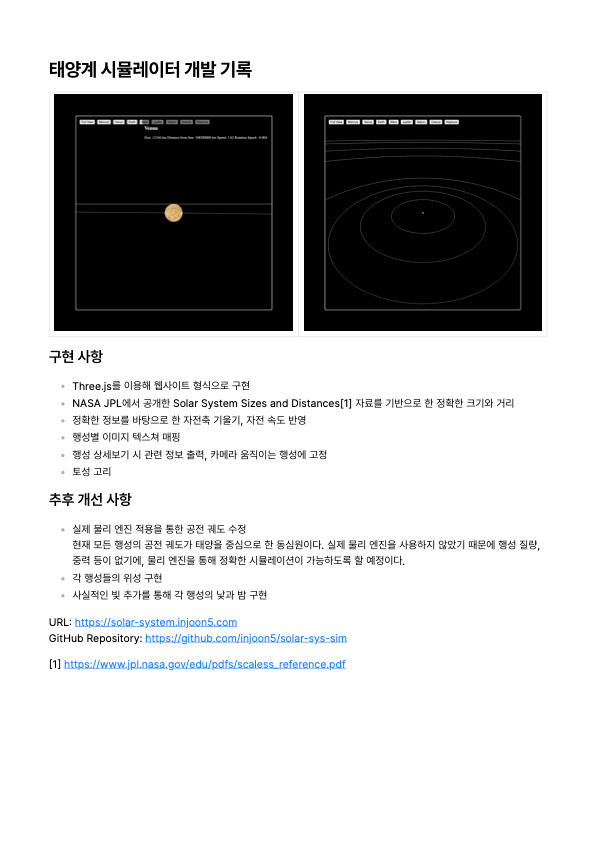
solar-sys-sim is a browser-based solar system built with Three.js. All eight planets orbit the sun with real distances (in km), real radii, and relative orbital speeds. Textured spheres, white orbit ellipses, Saturn gets a ring mesh.
Live at solar-system-ten-dun.vercel.app.
Why I built it
I’d been going through a Three.js phase — wanted something visual that wasn’t another dashboard. Space sims are the hello-world of 3D on the web, but doing it with actual numbers and NASA-style textures made it feel less like a tutorial and more like a toy I’d actually open.
How it works
Almost everything lives in a single index.html — one big inline <script type="module"> with Three.js imported via Vite. There’s a main.js, but don’t be fooled: the real sim is all in the HTML file.
Scene setup
PerspectiveCamerawith far clipping plane set to1e16— necessary because planet distances are in actual kilometers (Neptune at ~4.5 billion km)OrbitControlsfor free look-around- Sun:
SphereGeometry(1391400, 64, 64)with aSun.jpgtexture,MeshBasicMaterial
Planet data
Each planet is an object in an array with name, size, distance, texture, speed, rotationSpeed, and tilt (axis inclination in radians). Notable values:
- Venus: negative
rotationSpeed(retrograde spin), 177° tilt - Uranus: 97.8° tilt (on its side)
- Saturn:
hasRings: truewith a separateRingGeometrychild mesh
Animation loop
Planets orbit on the XZ plane:
planet.mesh.position.x = Math.cos(angle) * planet.distance;
planet.mesh.position.z = Math.sin(angle) * planet.distance;
Angle advances via Date.now() * 0.000001 * planet.speed. Each mesh also rotates on its Y axis every frame.
Orbit paths are EllipseCurve → BufferGeometry → white LineBasicMaterial, rotated 90° to lie flat.
Camera follow
Click a planet button and locatePlanet() starts a recursive requestAnimationFrame loop that positions the camera behind the planet (distance * 10 back, size up) and calls lookAt + updates OrbitControls.target. A stopFollowing flag breaks the loop when you hit Full View.
Full View (backToMainView) teleports the camera to (0, 8000000000, 0) looking down at the origin — bird’s-eye of the whole system.
An info panel on the right shows size, distance, orbital speed, and rotation speed for the selected planet.
Stack
Three.js ^0.164.1, Vite for dev and build, textures sitting in /public. No backend at all — it’s pure client-side WebGL.
It’s not scientifically perfect (good luck spotting Mercury from the default zoom), but for clicking around between classes it does the job.